![Hagleitner_Logo.png]](https://knowledge.hagleitner.com/hs-fs/hubfs/Hagleitner/Hagleitner%20-%20Logo/Hagleitner_Logo.png?height=40&name=Hagleitner_Logo.png)
About empty the tank
With "Empty the tank" you can empty the reserve tank of a liquid dispenser via the Hagleitner360 app. This is helpful when you change refills and the new refill is a different product, so there is no mixture of multiple products in the reserve tank.
Empty the tank with the Hagleitner360 app
- Open the Hagleitner360 app and select a customer number.
- Go to "Devices".
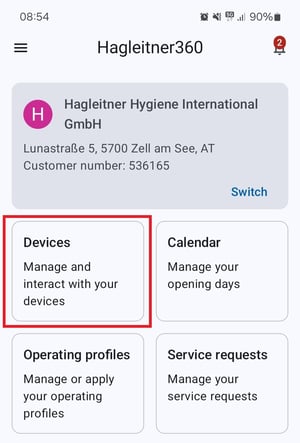
- Select a liquid dispenser in the list or scan its QR code with the QR code button.
- Connect to the device.
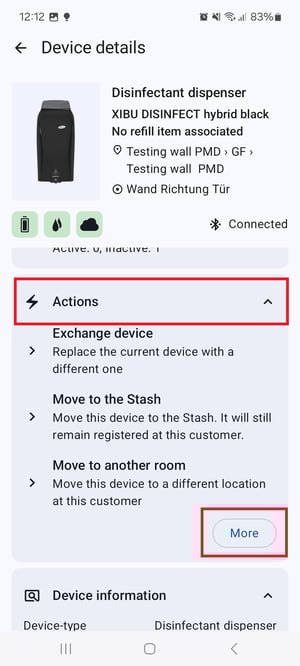
- Scroll down to "Actions" > "More".
- Scroll down to "Empty the tank".
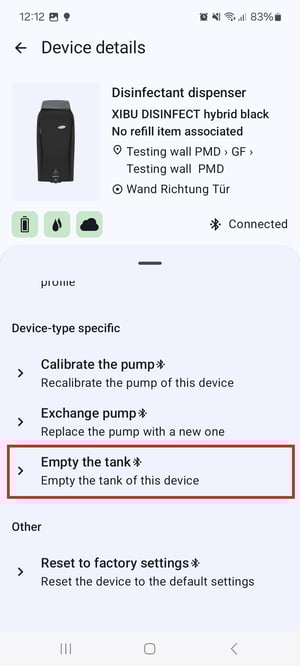
- Follow the app's instructions.