![Hagleitner_Logo.png]](https://knowledge.hagleitner.com/hs-fs/hubfs/Hagleitner/Hagleitner%20-%20Logo/Hagleitner_Logo.png?height=40&name=Hagleitner_Logo.png)
Potential solutions for the different connection options
Potential solutions for ethernet cable connection
- Make sure the ethernet cable is in the WAN port of the gateway.
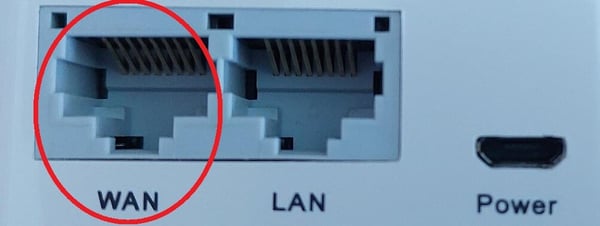

- Make sure the network allows the gateway to reach the necessary connections that are needed for operation.
The necessary connections together with their URLs, IPs and ports can be found in the HsM reference manual.
Notice: The network's administrator can allow these necessary connections in the firewall/network.
Potential solutions for Wi-Fi connection
- Make sure there are no further authentications for the gateway after the configuration (like accepting terms of service/use, etc.) Further authentication is common in a guest or free Wi-Fi.
- Try to use a different Wi-Fi with no further authentications after the configuration.
- Or exempt the gateway via its MAC address from further authentication in the Wi-Fi network.
Tip: You can find the gateway's MAC address on the device's QR code (third line). Or you can find it via the HsM web portal/Hagleitner360 app on the device detail page.
- Make sure the network allows the gateway to reach the necessary connections that are needed for operation.
The necessary connections together with their URLs, IPs and ports can be found in the HsM reference manual.
Notice: The network's administrator can exempt the gateway from further authentications after the configuration and allow these necessary connections in the firewall/network.
- Make sure the Wi-Fi network is using a Wi-Fi standard, that is supported by the gateway.
A table with all the supported Wi-Fi standards can be found in the HsM reference manual.
Potential solutions for SIM card connection
- Make sure your SIM card provider activated the SIM card in use.