![Hagleitner_Logo.png]](https://knowledge.hagleitner.com/hs-fs/hubfs/Hagleitner/Hagleitner%20-%20Logo/Hagleitner_Logo.png?height=40&name=Hagleitner_Logo.png)
Information about the product lock
In order to guarantee a satisfying disinfection via the wet wipes, you can enable the product lock feature at a XIBU 2WIPE hybrid device. After reaching the the expiration date the device's active hatch will be locked.
Activating the product lock
Via the Hagleitner360 app the product lock feature can be enabled and disabled at a XIBU 2WIPE hybrid device.
- Open the Hagleitner360 app and select a customer number.
- Go to "Devices".
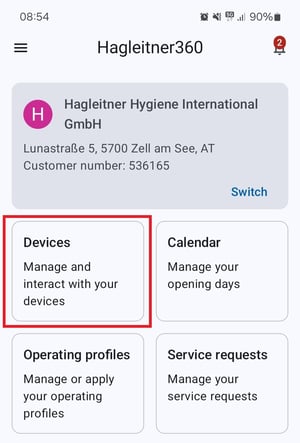
- Select a XIBU 2WIPE hybrid device via the device list or scan its QR code with the QR code button.
- Go to "Settings" > "More".
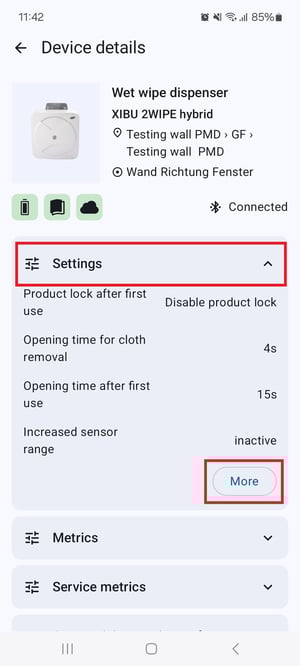
- Toggle the switch at "Product lock after first use" to active.
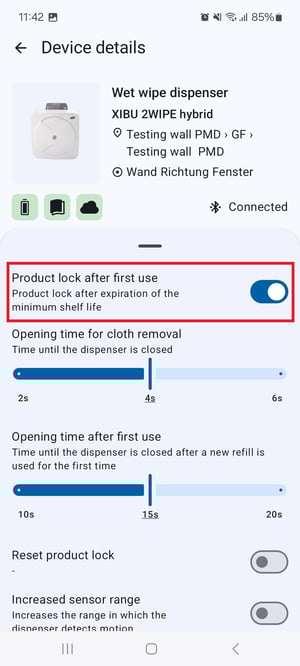
- Tap on "Apply changes".
- Go back to the settings and tap on "Product lock of refill" and select the refill you use in the wet wipe dispenser.
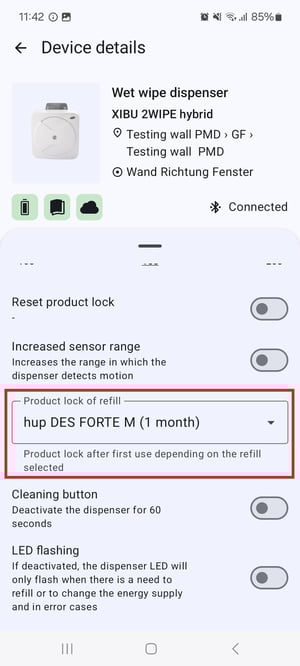
- Tap on "Apply changes".
When does the minimum shelf-life start?
The minimum shelf life starts when the first use is triggered at the respective hatch, regardless of whether the product lock setting has been activated with the app or not. With the product lock in the app active, the wet wipe dispenser just locks the active hatch when the minimum shelf life ended.
How to reset the product lock when both hatches got locked
- Open the XIBU 2WIPE hybrid device via the XIBU key.
- Take out the expired refills.
- Close the device.
- Open the device again.
- Put in the new refills and close the device.