![Hagleitner_Logo.png]](https://knowledge.hagleitner.com/hs-fs/hubfs/Hagleitner/Hagleitner%20-%20Logo/Hagleitner_Logo.png?height=40&name=Hagleitner_Logo.png)
Information on Service Requests
Service requests for XIBU second-generation devices, integral 2GO HsM/4PM, and HsM GatewayLAN/SIM are submitted using the HsM system via the Hagleitner360 app or the HsM web portal. You can create a service request for devices that are already registered in HsM (distinct service request), as well as for devices that have not yet been registered in HsM (indistinct service request).
Note: The indistinct service request should only be used if the device requiring service cannot currently be registered.
Navigation
- Distinct service request using HsM web portal or Hagleitner360 app
- Indistinct service request using HsM web portal or Hagleitner360 app
Distinct service request in the HsM web portal
- Open the HsM web portal.
- Use the customer search function to locate and select the desired customer number.
- Navigate to “Devices” and select “Device list.”
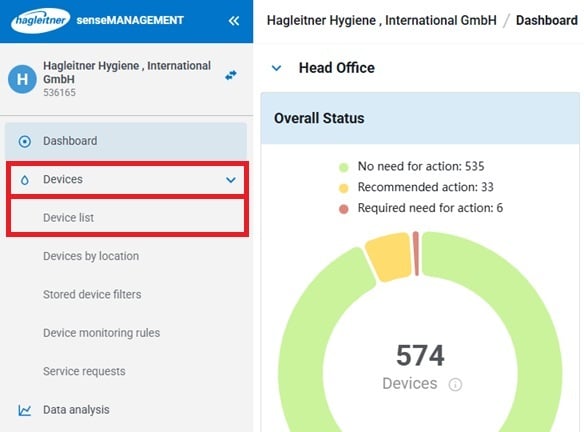
- Select the desired device.
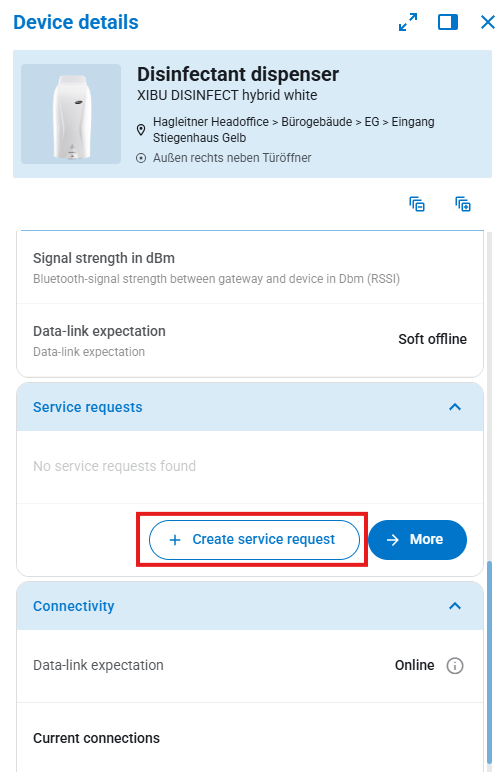
- In the information panel on the right, click on “Service requests” and then select “Create service request.”
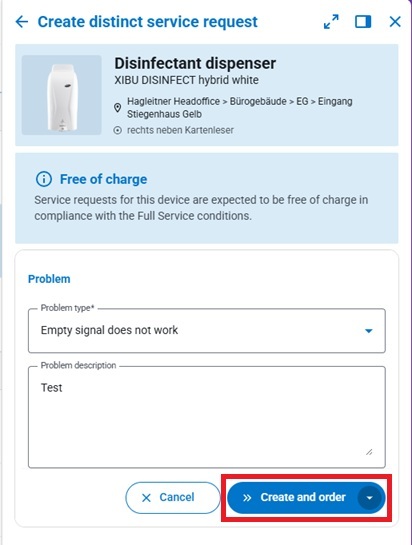
- Specify the type of issue.
- Optionally, you may add a description for additional details.
- Click the "Create and order" button to submit the service request.
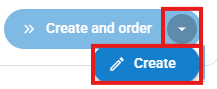
- Alternatively, click "Create" to save the repair request and submit it at a later time.
- Alternatively, click "Create" to save the repair request and submit it at a later time.
Distinct service request in the Hagleitner360 app
- Open the Hagleitner360 app.
- Search for the relevant customer number.
- Tap on "Devices."
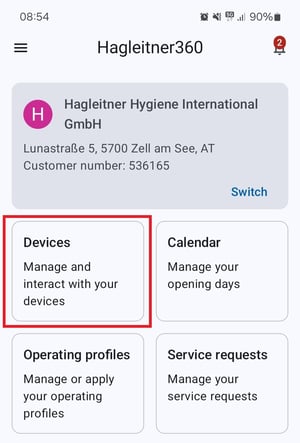
- Select the relevant device.
- In the device detail view, tap “Service requests”.
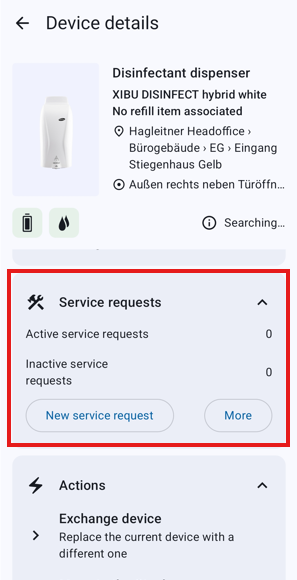
- Tap the "New service request" button.
- Specify the type of issue.
- Optionally, add a description for further details.
- Tap "Done" and "Order now" to submit the service request.
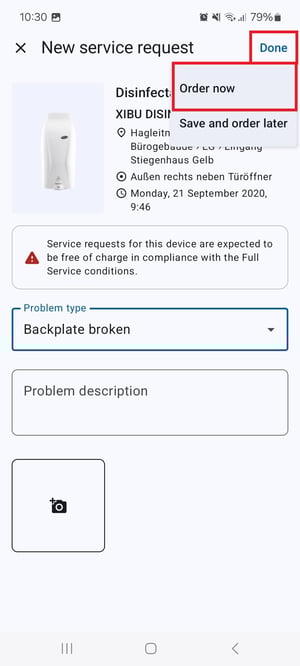
- Alternatively, tap "Save and order later" to submit the service request at a later time.
Indistinct service request in the HsM web portal
- Open the HsM web portal.
- Use the customer search function to locate and select the required customer number.
- Click on “Devices” and then select “Service requests.”
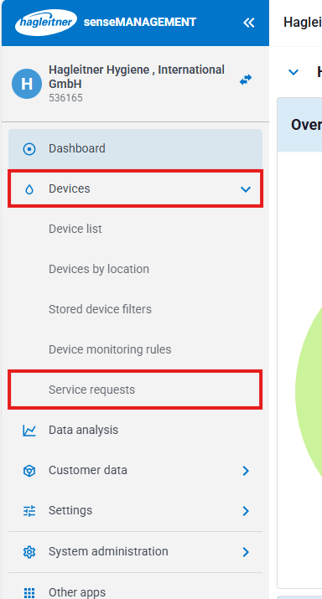
- Click the blue “Request service” button.
- Specify the device type (e.g., paper towel dispenser).
- Optionally, indicate the device variant.
- Enter the location of the device requiring repair.
- Select the type of defect.
- Optionally, provide a description for additional details.
- Click the “Create and order” button to submit the service request.
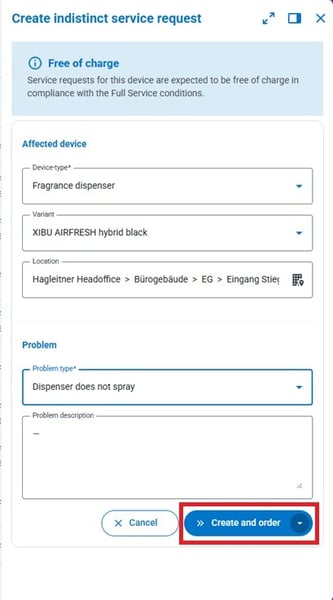
- Alternatively, click “Create” to save the service request and submit it at a later time.
Indistinct service request in the Hagleitner360 app
- Open the Hagleitner360 app.
- Search for the desired customer number.
- Tap on “Service requests.”
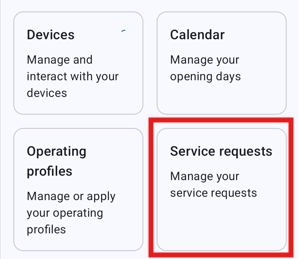
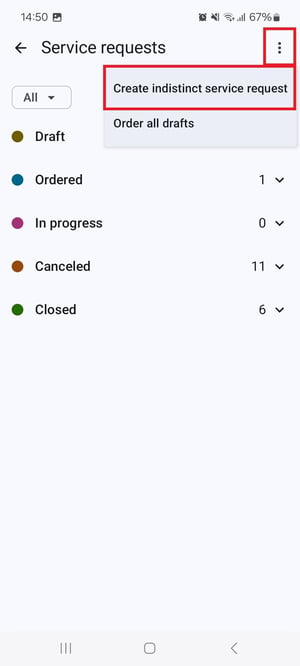
- Tap the three-dot menu in the upper right corner.
- Tap “Create indistinct service request.”
- Specify the device type (e.g., paper towel dispenser).
- Optionally, indicate the device variant.
- Enter the location of the device requiring repair.
- Select the type of defect.
- Optionally, provide a description for additional information.
- Tap “Done” and “Order now” to submit the repair request.
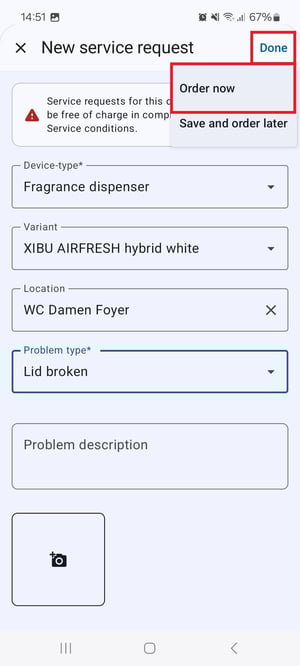
- Alternatively, tap “Save and order later” to submit the service request at a later time.