![Hagleitner_Logo.png]](https://knowledge.hagleitner.com/hs-fs/hubfs/Hagleitner/Hagleitner%20-%20Logo/Hagleitner_Logo.png?height=40&name=Hagleitner_Logo.png)
Connection to gatewayLAN/SIM via the Hagleitner360 app
The connection between the smartphone with the Hagleitner360 app on it and the gatewayLAN/SIM is happening via the gateway's own access point Wi-Fi.*
Potential solutions
- Check if Wi-Fi is active on your smartphone.
- Make sure you are in Wi-Fi range of the gatewayLAN/SIM.
- Make sure the access point Wi-Fi is active on the gatewayLAN/SIM.
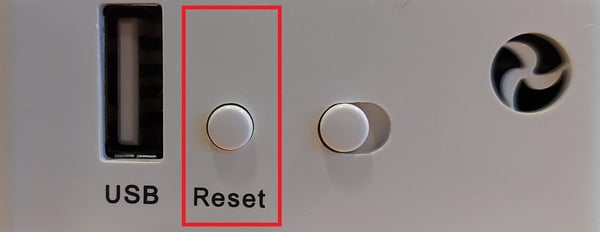
- To activate the access point Wi-Fi, hold the reset button pressed for 2 to 6 seconds. At the gatewaySIM you will need a paper clip to press the button.

- To activate the access point Wi-Fi, hold the reset button pressed for 2 to 6 seconds. At the gatewaySIM you will need a paper clip to press the button.
*Notice: When the gatewayLAN/SIM has an internet connection the access point Wi-Fi gets deactivated. When the internet connection gets lost the gateway will reactivate the access point Wi-Fi after an hour of no internet connection.